Turn your tangled GoHighLevel automations into clear blueprints.

Flow Inspector's automation timeline shows you every workflow a contact touched, in the exact order it happened, with precise timing between each step. Verify new automations are firing correctly before they process real leads. Diagnose failures in minutes rather than hours when something goes wrong. Spot race conditions, timing gaps, and silent handoff failures without digging through GHL's fragmented execution logs.

30-day money-back guarantee  ·  Cancel anytime  ·  All features included
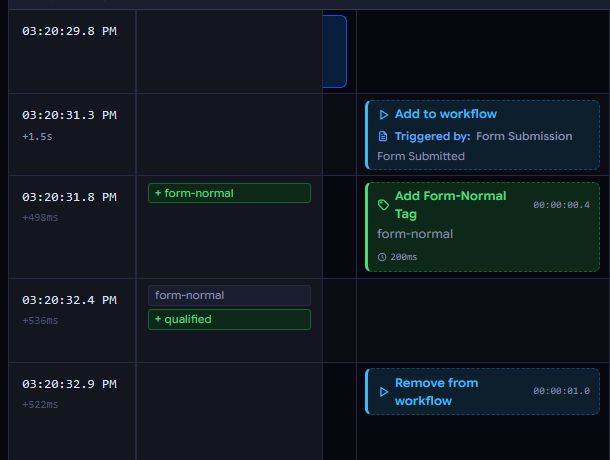
One contact. Every automation. Every step...in order.

Who it's for

Flow Inspector is built for you if:

  • You manage client subaccounts and need to prove automations are working, or find out fast when they aren't.
  • You build automation systems for clients and want to QA your work before handing it off.
  • You've ever spent hours clicking through GHL execution logs trying to reconstruct what actually happened to a contact.
  • You run complex multi-automation workflows and need to see how they interact with each other in real time.
  • You're a GHL SaaS reseller managing high volumes of sub-accounts where silent failures cost you clients.

From fragmented logs to a complete timeline in four steps.

1

Connect your GHL account

Link Flow Inspector to your GHL sub-account in minutes. Your workflow map loads automatically, ready to match against any contact's automation history. Flow Inspector only requests read access. It never writes to or modifies your GHL account.

2

Load a contact's audit log

Export a contact's audit log CSV directly from GHL. It takes about 30 seconds. Drop it into Flow Inspector and their timeline starts building immediately, pulling in every tag change, field update, and system event in chronological order.

3

Capture execution log data

Flow Inspector includes a lightweight Chrome extension that captures the detailed execution log data GHL exposes internally but doesn't yet make available through its public API. Install it once, and capturing a workflow's full step-by-step execution data is a single click. (When GHL opens up their API, this step goes away entirely.)

4

Read the timeline

Every automation the contact touched appears as its own column. Every step, in order, with exact timestamps and elapsed time between each one. Expand cards for deeper detail where it matters: webhook payloads, condition results, AI step outputs, wait durations, and trigger sources. Use the built-in AI Analysis to surface patterns, gaps, and anomalies automatically.

See the whole picture

Five things Flow Inspector shows you that GHL can't

Every automation, side by side

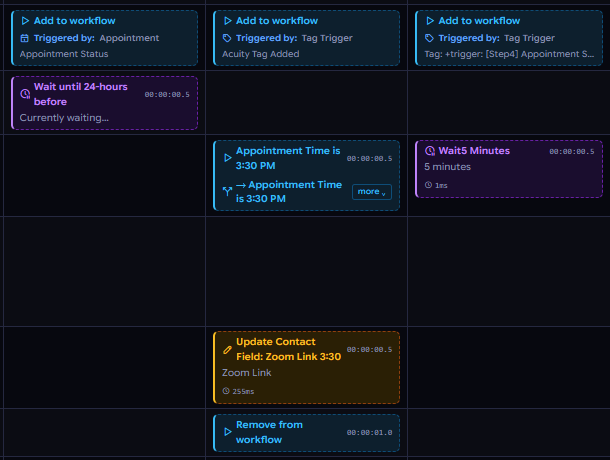
When a contact moves through multiple workflows, GHL shows you each one in isolation. Flow Inspector puts them all on the same timeline: every column, every step, in the exact order they happened. For the first time, you can see how your automations interact with each other.

What actually happened inside each step

GHL's execution log tells you a step ran. Flow Inspector tells you what it did. Expand a webhook card to see the full payload, a condition card to see which branch fired and why, or an AI step to see exactly what was sent and what came back.

AI Analysis that asks the right questions

Open the AI Analysis drawer and ask anything about the timeline, in plain English, using the AI model you already use and trust. Spot race conditions, identify timing gaps, summarize a contact's full automation journey, or get a second opinion on why something didn't fire the way you expected.

Tag State view

Tags are the connective tissue of GHL automation. They trigger workflows, control branching, and determine what a contact sees next. Flow Inspector's Tag State view shows you every tag added and removed, in order, so you can see exactly how a contact's tag profile evolved throughout their journey.

Timing that tells a story

Every card in the timeline shows you exactly how long after the previous step it fired, and flags it when GHL resumes a wait step later than scheduled. Timing gaps and late resumes are invisible in GHL's native logs. In Flow Inspector they're front and center.

Our story

Why Flow Inspector exists

Flow Inspector started as a tool we built for ourselves.

As GoHighLevel agency operators managing many client sub-accounts, we kept running into the same problem: a lead would fall through the cracks, or an automation wouldn't handle them the way we intended, and we had no efficient way to figure out why. Especially in complex, multi-step automation stacks.

GHL's execution logs are fragmented lists. Nearly impossible to read across multiple automations and workflow handoffs. We're visual people, so we found ourselves spending hours manually mapping out automation journeys in Figma just to understand where a connection was failing, where a handoff was breaking, or where a race condition might be occurring.

So we built the tool we wished existed.

As it turned out, other GHL specialists needed it too.

Security and privacy

Your data stays yours. Full stop.

Read-only access

Flow Inspector connects to your GHL account with read-only access using their secure Private Integration tokens. We never write to, modify, or store your GHL contact data on our servers.

Never sold, never shared

Your GHL credentials are never sold, shared, or used for any purpose other than connecting you to your own account. Your data is yours. No third-party data sharing and no ad tracking.

Your AI, your keys

The AI Analysis feature uses the API key from your own AI account of choice (Anthropic, Gemini, OpenRouter, OpenAI, etc). Your timeline data, analysis, and all queries go directly through your chosen AI account, not us.

Full details in our Privacy Policy.

Simple, honest pricing

One price. All features included. No upsells, no seat fees, no feature-gating.

At $19 a month, Flow Inspector costs less than a single billable hour for most GHL specialists. The first automation issue it helps you find in minutes instead of hours pays for the subscription many times over.

$19/ month
Regular Price: $24/ month

Cancel anytime. 30-day money-back guarantee.

  • Full timeline view across all automations
  • AI Analysis with your chosen model
  • Chrome extension for execution log capture
  • Tag State view
  • Multi-account support
  • Every feature we ship, now and in the future
Early Access Sign-Up

If after 30 days it doesn't save you time, request a full refund. No questions asked.

Refer a GHL specialist, get a free month

Share your unique referral link and earn one free month for every GHL specialist you bring in, automatically credited to your account. No limit on referrals.

We like easy math. For example, refer 12 users*, you get to use Flow Inspector free for a year!

*A referred user is defined as someone who signs up and remains a paying subscriber for at least 60 days without canceling or requesting a refund.

Early
Access
Pricing

Ready to see your GoHighLevel automations clearly?

Join GHL specialists who are already diagnosing faster, verifying confidently, and spending less time guessing what went wrong.

Sign Up Now

30-day money-back guarantee  ·  Cancel anytime  ·  All features included
Know other GHL specialists who'd benefit? Every referral earns you a free month.